
Make the request clear.
Improve the relevant service or consultation path. A full website rebuild is quoted separately when it is justified.
FOR MED SPAS, WELLNESS PRACTICES & CLINICS
Connect the work around your clients—from the first inquiry to staff follow-up, practice operations and reviewed records. Choose the software and AI assistance your team needs, with people responsible for the decisions.
Start with one repeated task or missed handoff. Explore the software below, then agree the tools, responsibilities and checks for your setup.
Quote-only scope · supported tools · no patient details in the public inquiry.

BUILT AROUND YOUR PRACTICEYour team. Your tools.
One connected practice.
EXPLORE THE SOFTWARE
Inspect our authored practice inbox and recorded Books demonstration. These examples show the interface and review steps—not client results or live connections.
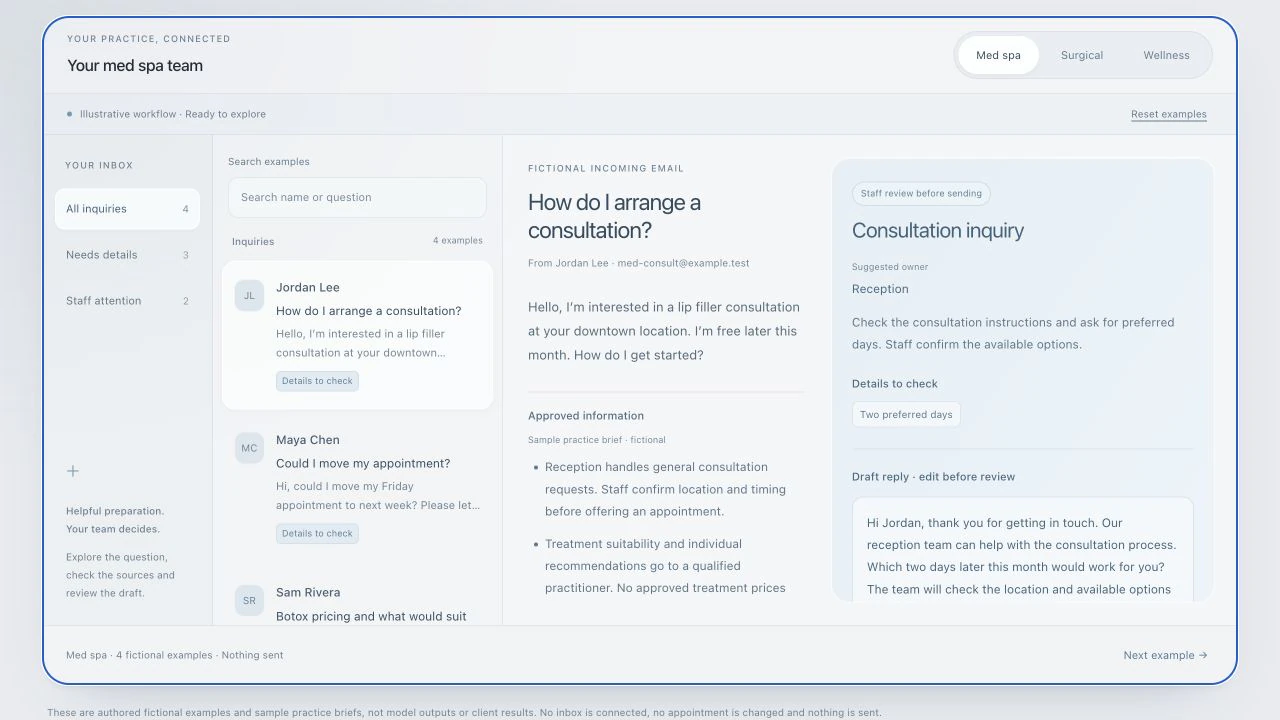
INBOUND DESK · FICTIONAL EXAMPLE
A fictional consultation request is shown beside sample practice information, missing details and a proposed reply. Reception is the suggested owner; treatment questions remain with a qualified professional.
Explore the inboxAuthored examples, not live AI output. No mailbox is connected and nothing is sent.
Inspect source records, review steps and recorded results. The public demonstration does not post, pay or file.
PRACTICE APP · CAPABILITY OVERVIEWExplore preparation, assigned-team messaging and approved sharing, with access and delivery agreed separately.
ABOUT & HOW WE WORKReview our company identity, delivery method and the distinction between demonstrations and accepted client work.
01 / A FOCUSED FIRST ENGAGEMENT
Available · scoped service
Improve the path from a practice website inquiry to a reviewed next step, using supported tools and clear staff ownership.
Improve the relevant service or consultation path. A full website rebuild is quoted separately when it is justified.
Connect one agreed form or inquiry route to one agreed inbox or supported CRM destination, then verify provider acceptance and actual inbox arrival with the receiving person.
Define the approved acknowledgment, the staff owner and how unresolved requests are surfaced for human review.
Walk through the agreed route with the team and document what is included, what remains manual and who owns the accounts.
Quote only. The written scope defines deliverables, supported connections, dependencies, acceptance checks and ongoing support. Vendor and usage costs stay separate.
CHOOSE YOUR PRACTICE
Your service mix, staff roles and client relationships shape the right setup. Explore the workflows that fit your practice—not a generic bundle of features.
A clearer path from treatment interest to a prepared consultation, a reviewed next step and the follow-up your team owns.
02 / YOUR PRACTICEConnect program information, client preparation, membership handoffs and the everyday work behind a wellness practice.
03 / YOUR PRACTICEPractice software and administrative AI workflows for clinics, aesthetic medicine and surgical teams—with clinical decisions kept in professional hands.
02 / PRODUCTS & SERVICES
Start where your team needs more clarity. Select one product or agree how several workflows should connect.
Organize routine requests, spot missing details and prepare replies for staff review.
Explore Accounting & inventoryRecorded fictional demonstration · scoped separatelyBring purchasing, stock records and accounting review into a traceable workflow.
Explore Website designAvailable · scoped projectHelp people understand your services, trust your team and request a consultation or program information through a clear practice website.
Explore Website careAvailable · scoped careKeep service menus, practitioner profiles, program details and contact paths current through agreed checks and updates.
Explore SEO & AI discoverySearch setup available · custom workflows scoped separatelyConnect service and location pages with technical SEO, local search and AI discovery, so prospective patients and clients can understand your practice.
Explore Email & inquiry systemsAvailable · scoped setupGive consultation and program requests a clear route to reception or your coordinator. Set up agreed notifications and verify inbox delivery.
Explore Practice AppScoped by written agreementGive clients a branded place to prepare, communicate with their assigned care team and return to approved information.
Explore03 / FROM SCOPE TO HANDOFF
Start with the work your team wants to improve, the tools they use and the handoff that needs attention.
Walk through the current process and identify where the team needs a clearer next step.
Put deliverables, access, price, checks and responsibilities in writing.
Check the agreed path together and make ownership and ongoing support clear.
THE PRACTICE JOURNEY
The website, inbox, staff workspace and client experience should support one connected journey without pretending every tool owns the same record.
Use accurate service, practitioner and location information so the right person can decide whether to ask a question.
Give the visitor a clear route and make the receiving person, fallback and unresolved state visible.
Use the selected app, email or staff workflow to provide the right administrative information without turning it into clinical advice.
Connect only the supported sources needed for ownership, inventory, finance or another agreed workflow.
Use reviewed messages, check-ins or reminders with a named owner and the appropriate communication permission.
04 / GUIDES
A LITTLE CLARITY
Yes. Website, care, search and email-delivery work can be scoped separately. A software setup is not required.
Discuss a focused setup for Inbound Desk, Books and inventory or the Practice App. Public previews use fictional examples or recorded demonstrations. Your written agreement defines the selected capabilities, supported connections, setup, ongoing support and pricing.
We begin with the tools you already use and review supported access before agreeing an integration.
LET’S DISCUSS YOUR PRACTICE
Start with your practice type, the tools you use and the work that frustrates your team. Our software team will review the inquiry and discuss a focused next step.
Please leave out patient details, passwords and medical information.